안녕하세요. @anpigon입니다.
이 포스팅은 제가 스팀잇과 프론트엔드 기술을 공부하고 앱을 구현하는 과정을 정리한 글입니다. 그래서 설명이 많이 부족할 수 있습니다. 궁금한 사항은 댓글로 문의하시면, 최대한 답변해드리도록 노력하겠습니다.
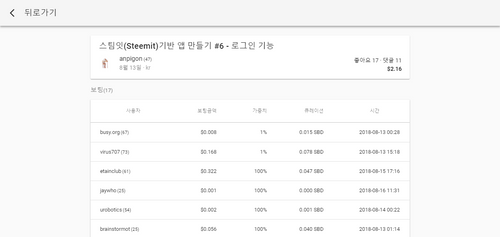
이번에는 아래와 같이 보팅 내역을 볼 수 있는 페이지를 구현하였습니다.
구현된 앱은 steemlog.github.io 에서 확인 할 수 있습니다.
보팅 내역을 표시하는 VoteHistory 컴포넌트 를 구현하자. 아래와 같이 VoteHistory.vue 파일을 생성한다.
1
2
3
4
5
6
7
8
9
10
11
12
13
14
15
16
17
18
19
20
21
22
23
24
25
26
27
28
29
30
31
32
33
34
35
36
37
38
39
40
41
42
43
44
45
46
47
48
49
50
51
52
53
54
55
56
57
58
59
60
61
62
63
64
65
66
67
export default { computed : { votes () { let totalRshares = 0 let totalWeight = 0 this .active_votes.forEach(e => totalRshares += parseFloat (e.rshares) totalWeight += parseFloat (e.weight) }) return this .active_votes.map(e => let value, curation if (this .pending_payout_value > 0 ) { value = (e.rshares * (this .global.rewardBalance / this .global.recentClaims) * this .global.price) curation = '≈$' + (e.weight / this .total_vote_weight * this .pending_payout_value * 0.25 / this .global.price).toFixed(3 ) } else { const o = '$' + this .total_payout_value / (this .total_payout_value + this .curator_payout_value) value = e.rshares / totalRshares * parseFloat (this .total_payout_value / o) curation = (e.weight / totalWeight * this .curator_payout_value).toFixed(3 ) } return { voter : e.voter, reputation : steem.formatter.reputation(e.reputation), weight : e.percent / 100 , value : value.toFixed(3 ), curation : curation, time : new Date (e.time + 'Z' ) } }) }, ...mapState({ global : state => }) }, beforeCreate () { const author = this .$route.params.author const permlink = this .$route.params.permlink steem.api.getContentAsync(author, permlink) .then(n => this .title = n.title this .total_vote_weight = n.total_vote_weight this .pending_payout_value = parseFloat (n.pending_payout_value.split(' ' )[0 ]) this .total_payout_value = parseFloat (n.total_payout_value.split(' ' )[0 ]) this .curator_payout_value = parseFloat (n.curator_payout_value.split(' ' )[0 ]) this .active_votes = n.active_votes this .author = n.author this .author_reputation = n.author_reputation this .created = n.created this .category = n.category this .net_votes = n.net_votes this .children = n.children this .cashout_time = n.cashout_time }) .catch(e =>console .log(e)) .finally(() => (this .loading = false )) }, created () { this .$store.dispatch('global/loadGlobalProperties' ) } }
코드량이 많아서 핵심 로직만 남기고 생략하였습니다. 전체 소스는 깃허브 소스를 참고하길 바랍니다.
그리고 Router에 VoteHistory 컴포넌트 경로를 추가한다. /@anpigon/steemit-7/vote 형태의 경로(path)는 VoteHistory 컴포넌트 로 연결될 것이다.
1
2
3
4
5
6
7
8
9
10
11
export default new Router({ routes : [ { path : '/@:author/:permlink/vote' , name : 'VoteHistory' , component : () => import ('@/components/VoteHistory' ) }, ] })
포스트 하단의 좋아요 텍스트를 클릭하면 보팅 내역 페이지로 이동하게 만들자. VoteHistory 컴포넌트 의 링크 연결에는 <router-link>를 사용한다. Main 컴포넌트 와 PostView 컴포넌트 에서 ‘좋아요’ 텍스트를 찾아서 아래와 같이 수정한다. 이제 **‘좋아요’**를 클릭하면 보팅 내역 페이지로 이동할 것이다.
1 <router-link :to ="'/@' + author + '/' + permlink + '/vote'" class ='mr-1' > 좋아요 {{ net_votes }}명</router-link >
다음은 VoteHistory 컴포넌트 를 구현하면서 추가로 수정한 내용이다.
메인 컴포넌트 외에는 상단바에 뒤로가기 버튼만 보이도록 수정하였다.

다음과 같이 Main 라우터에 메타(meta) 데이터를 추가한다. meta.main의 값으로 메인 컴포넌트인지 아닌지를 판단할 것이다.
1
2
3
4
5
6
7
8
9
10
11
export default new Router({ routes : [ { path : '/' , name : 'Main' , component : Main, meta : { main: true } }, ] })
그 다음에 App.vue 파일을 수정한다. computed에 메인 컴포넌트를 판단하는 isMainComponent를 추가하였다.
1
2
3
4
5
6
7
8
9
10
export default { computed : { isMainComponent () { return !!this .$route.meta.main } } }
그리고 아래와 같이 뒤로가기 버튼만 있는 상단바 <v-toolbar>를 추가한다. 해당 상단바는 isMainComponent가 false 인 경우에만 보여진다.
1 2 3 4 5 6 <v-toolbar fixed app v-show ='!isMainComponent' > <v-toolbar-side-icon @click.stop ="$router.go(-1)" > <v-icon > arrow_back_ios</v-icon > </v-toolbar-side-icon > <v-toolbar-title class ="ml-0" > 뒤로가기</v-toolbar-title > </v-toolbar >
아래 화면과 같이 피드, 최근글, 인기글, 대세글 메뉴를 상단바에 추가하였다.
각 메뉴를 선택했을 때 보여줄 컴포넌트를 구현하자. 우선 Main.vue 에서 글목록을 보여주는 코드를 분리하여 Discussions.vue 파일을 만들자. 피드(FeedPanel) , 최신글(CreatedPanel) , 인기글(HotPanel) , 대세글(TrendingPanel) 컴포넌트는 Discussions.vue 를 상속받아서 구현할 것이다.
생성할 컴포넌트 파일 구조는 다음과 같다.
1
2
3
4
5
6
7
8
9
10
src └── components ├── panels │ ├── Discussions . │ ├── FeedPanel . │ ├── CreatedPanel . │ ├── HotPanel . │ └── TrendingPanel . └── ...
Main.vue 에서 글목록을 담당하는 코드를 분리하여 Discussions.vue 파일에 저장한다. Main.vue 에서 분리되어 필요없는 코드를 지우고 아래와 같이 <router-view>로 대체한다. <router-view> 영역에는 피드, 최신글, 인기글, 대세글 컴포넌트를 렌더링하여 보여줄 것이다.
1 2 3 4 5 <v-flex xs12 md9 > <keep-alive > <router-view > </router-view > </keep-alive > </v-flex >
그 다음에 FeedPanel.vue , CreatedPanel.vue , HotPanel.vue , TrendingPanel.vue 파일을 생성한다. 각각 컴포넌트들은 Discussions.vue 를 상속받아서 구현한다.
컴포넌트 상속을 구현하기 위해서 Vue에서 제공하는 기능인 믹스인(mixin) 을 사용하였다. 그리고 Discussions.vue 를 상속받아 구현된 FeedPanel.vue 의 전체 코드는 아래와 같다.
1
2
3
4
5
6
7
8
9
10
11
12
13
14
15
16
17
18
19
20
<script> import steem from 'steem' import Discussions from './Discussions' export default { name : 'Feed' , mixins : [ Discussions ], methods : { getDiscussions () { const query = { tag : this .$route.params.username, limit : 11 , start_permlink : this .next.permlink, start_author : this .next.author } return steem.api.getDiscussionsByFeedAsync(query) } } } </script>
FeedPanel.vue 는 Discussions.vue 를 상속받았으므로 Discussions.vue 의 기능을 그대로 사용할 수 있다. 그래서 글을 가져오는 로직이 달라져야 하는 getDiscussions() 함수만 재정의 하였다.
CreatedPanel.vue, HotPanel.vue, TrendingPanel.vue 도 Discussions.vue 를 상속받아 구현한다.
마지막으로 Main 라우터 를 수정한다. 각 컴포넌트들은 Main.vue 하위에 있어야 한다. 그래서 아래와 같이 Main 라우터 children에 Feed , Created , Hot , Trending 라우터를 등록하였다.
1
2
3
4
5
6
7
8
9
10
11
12
13
14
15
16
17
export default new Router({ routes : [ { path : '/' , name : 'Main' , component : Main, children : [ { path: 'default' , redirect : { name: 'Created' }, alias : '' }, { name: 'Feed' , path : '@:username/feed' , component : () => import ('@/components/panels/FeedPanel' ), meta : { main: true }, props : true }, { name: 'Created' , path : 'created' , component : () => import ('@/components/panels/CreatedPanel' ), meta : { main: true } }, { name: 'Hot' , path : 'hot' , component : () => import ('@/components/panels/HotPanel' ), meta : { main: true } }, { name: 'Trending' , path : 'trending' , component : () => import ('@/components/panels/TrendingPanel' ), meta : { main: true } } ] }, ] })
다음은 완성된 화면입니다.
아래 화면과 같이 메뉴를 클릭하면 피드, 최신글, 인기글, 대세글을 가져옵니다.
전체 소스 내용은 github 에서 볼 수 있습니다. 그리고 구현된 앱은 steemlog.github.io 에서 확인 할 수 있습니다.
여기까지 읽어주셔서 감사합니다.